
Life360: Family Safety & GPS
Life360Lifestyle
4.8313.72K Reviews
- Version
- 26.40.0
- Installs
- 100.00M
- Age Rating
- Everyone
Screenshots
Our Review of Life360: Family Safety & GPS
 Analysis by Appyee
I find family-location apps most useful when they replace a stream of “Where are you?” messages with a shared plan everyone understands. Life360 is built around that idea: members of a private group can share their positions, while arrival alerts and driving-related tools add context. It is a lifestyle app from Life360, and its broad appeal is clear: it has more than 100 million installs and an average rating of 4.4 from around 2.1 million ratings. Those numbers suggest it is widely used, but whether it suits your household depends on how comfortable everyone is with ongoing location sharing.
Making the map work for your household
I’d use this section to think through how a shared map can stay helpful for people with different routines, comfort levels, and ways of processing information. Before inviting everyone, I’d agree on a simple purpose for the circle and choose only the alerts that make that purpose easier to meet. That creates a calmer starting point for the practical choices that follow.
Readability, navigation, and everyday setup
Installing Life360 is a breeze. Available on both Android and iOS, you can find it easily in your app store. Once downloaded, setting up your account is straightforward—just input some basic info and you’re good to go. The interface is intuitive, making navigation a piece of cake even for those who aren’t tech-savvy.
That simplicity matters most after the initial setup. A map is easy to understand at a glance, but it only helps if each person knows which circle they are sharing with and what the alerts mean. I’d take a few minutes together to agree on the purpose of the group, who belongs in it, and which places deserve notifications. That small conversation helps prevent the app from feeling like a surprise monitoring tool later.
For a household with several schedules, location sharing can reduce routine check-ins without replacing direct conversation. A parent might glance at the map to see whether a child has reached practice, then save a message for anything that needs an actual response. The useful distinction is between “I can see roughly where you are” and “I know you are safe and available.” The app can help with the first; it should not be treated as proof of the second.
Useful routines beyond watching a moving dot
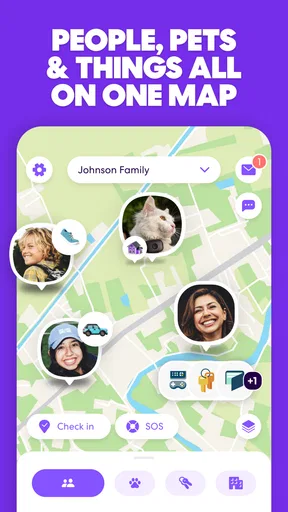
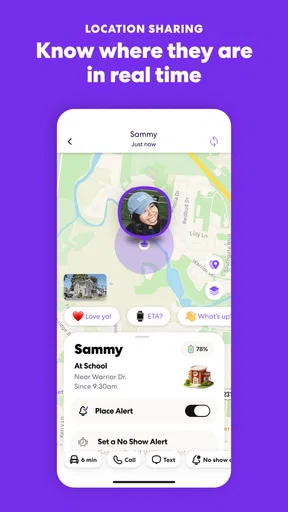
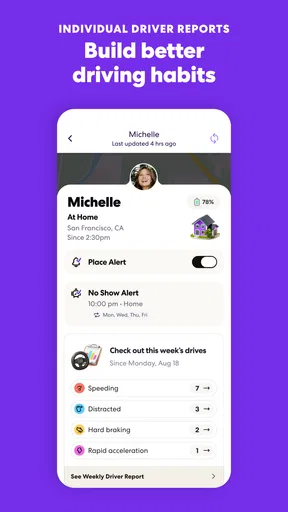
The app’s standout feature is the family or ‘circle’ tracking. You can create private groups (or circles) with your family members, allowing you to see each other’s real-time locations on a map. No more wondering if your kid made it to soccer practice! And for those who love road trips or have teen drivers, the driving analysis feature is a game-changer. It provides insights into driving patterns, like speed, hard braking, and phone usage while driving. Pretty neat, right?
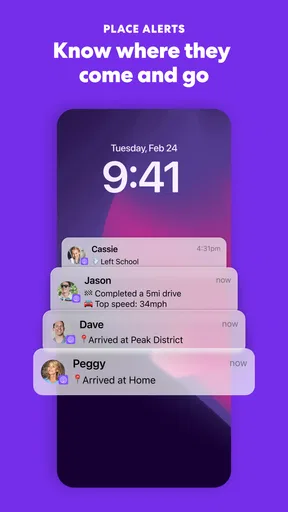
Another handy feature is the customizable alerts. You can set up notifications for when family members arrive or leave a location, ensuring you’re always in the loop without having to check your phone constantly.
A practical way to use those alerts is to keep them selective. If every ordinary trip creates a notification, the signal gets lost in the noise and people may start ignoring alerts altogether. I’d begin with only the places that solve a recurring coordination problem, such as home, school, or a regular activity venue, then adjust if the reminders prove distracting. This is less about tracking every movement and more about removing a specific uncertainty from the day.
Consider a realistic afternoon: one adult is still at work, another is handling errands, and a teenager is going from school to practice. Rather than repeatedly asking for updates, the family can check the shared map and use an arrival alert for the destination that matters. If plans change, a direct call or message still does the job better than interpreting a map. This routine works best when everyone understands that the app supports coordination rather than demanding constant attention.
The driving reports are a different kind of tool. They may give a family a starting point for a calm conversation about habits, but I would not use a score or a single trip as a verdict on someone’s driving. Routes, traffic, and unusual circumstances can affect what a report shows. For a teen driver, agreeing beforehand to discuss patterns rather than punish one isolated event makes the feature more constructive and less likely to undermine trust.
Different abilities, different situations
For someone who finds frequent texting difficult, a glanceable map and a limited set of arrival notifications may be easier than keeping up with a group chat. That can be helpful for busy caregivers, family members who prefer visual information, or people coordinating rides across a large household. The best setup is the one that reduces effort: keep the circle focused, choose meaningful alerts, and avoid expecting everyone to monitor the screen throughout the day.
Motor and sensory needs vary, so I would not assume the same interaction works equally well for everyone. A person who has trouble tapping accurately or handling a phone while moving should not be expected to manage the app during a journey. Set up circles and alert preferences while stationary, and treat driving as a time to leave the phone alone. Someone who finds repeated notifications stressful may prefer fewer alerts and a shared understanding that the map is available when needed, not a demand to respond immediately.
Location tools can also be less useful in situations where a phone is left behind, switched off, or otherwise unavailable. That is an important everyday limitation: a missing update does not automatically explain what happened. If a family member has a communication or cognitive support need, agree on a backup plan that does not depend on interpreting the map alone. A planned call, meeting point, or trusted contact can fill the gap when the app is not enough.
Privacy, consent, and boundaries
Now, I get it, privacy is a big deal, and Life360 seems to understand that too. They’ve got robust privacy settings, allowing you to control who sees your location and when. You can even go into ‘ghost mode’ if you need some privacy. Plus, the app uses encrypted data, so your location info stays secure.
Even with controls, location sharing works best when it is discussed openly. I would explain what the household wants the app to make easier, then let each person ask questions before joining a circle. For teenagers in particular, a clear boundary—such as using the map for pickups and safety check-ins rather than questioning every stop—can make the arrangement feel more respectful. The technical ability to share a location should not be mistaken for a reason to watch someone constantly.
It is also worth reviewing circle membership when family arrangements change. A tool that once helped coordinate one household may become awkward after a move, a new caregiving arrangement, or a change in who handles pickups. Keeping membership and expectations current is a simple privacy habit, not just an account-cleanup task. If someone does not want continuous sharing, that preference deserves a real conversation rather than pressure to install the app.
Where it fits among alternatives—and where it doesn’t
Compared with simply texting “I’ve arrived,” Life360 is more useful when several people need a shared view and nobody wants to send repeated updates. Compared with a basic map-sharing option, its appeal is the combination of family circles, place alerts, and driving-related reporting. But if your only need is to share a location for one trip, a temporary share in a mapping or messaging app may be simpler and less involved. If a household already communicates reliably and does not need shared location, adding another app may create more noise than value.
It is also not a substitute for emergency services, a personal conversation, or a dedicated accessibility aid. A location on a screen cannot explain why someone has stopped moving, whether they need help, or whether the phone is with them. I would choose Life360 for routine coordination and family awareness, not as the sole safety plan for a person who needs guaranteed assistance. Families should decide in advance what they will do if someone cannot be reached, instead of assuming an app alert will resolve every situation.
Life360 is free to download, with in-app purchases ranging from about $1.49 to $249.99 per item. I would start by checking whether the free experience covers the household’s actual routine before considering any purchase; don’t pay for a broader package simply because it sounds reassuring. The app is rated for Everyone, and its current version is 25.50.1, with Android 10 as the minimum operating system. It has been around since April 7, 2010, which gives it a long history as a family-location option, though age alone is no guarantee that it matches every family’s needs.
What to consider before inviting everyone
Before you set it up, ask three practical questions: who genuinely needs to be in the circle, which arrival or departure moments are worth an alert, and what will the family do when the location does not update as expected? These questions keep the app from becoming an all-purpose surveillance habit. They also make it easier to tell whether it is helping: fewer unnecessary check-ins and smoother pickups are better measures than how often someone opens the map.
It may not be the right choice for people who dislike persistent location sharing, households that cannot agree on boundaries, or anyone looking for a simple one-off location link. It may also be a poor fit when notifications add stress or when a family needs a specialized support system rather than a general-purpose location app. In those cases, a phone’s built-in sharing tools, a direct check-in routine, or another focused solution may be more comfortable.
A useful tool when trust comes first
What I love most about Life360 is the sense of security it provides, particularly for families with kids. The peace of mind knowing where your loved ones are is invaluable. The app’s user-friendly interface and practical features make it a must-have for modern families trying to stay connected in a busy world.
While there are many apps out there promising similar features, few deliver as effectively as Life360. It’s not just about tracking; it’s about enhancing communication and ensuring safety, which is precisely what makes it a standout choice.
My recommendation is strongest for families who share rides, coordinate recurring activities, or want a convenient way to check whether someone has reached an agreed destination. It is less compelling for people who only need occasional sharing or who would find a live map intrusive. Used with consent, modest alerts, and a backup communication plan, it can make everyday logistics calmer. Used without those boundaries, the same visibility can feel like pressure rather than reassurance.
Ready to give it a try? Download Life360 from your app store and start exploring how it can make your life a little easier and a lot safer. Trust me, once you start using it, you’ll wonder how you ever managed without it!
Privacy and Permissions
See what permissions an app requests and how it handles your data.
- Contacts
- read your contacts
- Location
- approximate location (network-based), precise location (GPS and network-based)
- Phone
- directly call phone numbers, read phone status and identity
- Photos/Media/Files
- read the contents of your USB storage, modify or delete the contents of your USB storage
- Storage
- read the contents of your USB storage, modify or delete the contents of your USB storage
- Camera
- take pictures and videos
- Microphone
- record audio
- Wi-Fi connection information
- view Wi-Fi connections
- Device ID & call information
- read phone status and identity
- Other
- view network connections, pair with Bluetooth devices, access Bluetooth settings, change network connectivity, connect and disconnect from Wi-Fi, full network access, control Near Field Communication, read terms you added to the dictionary, run at startup, control vibration, prevent device from sleeping
Verdict
Strengths of Life360: Family Safety & GPS
- Real-time location sharing boosts safety.
- Geofencing alerts for specific areas.
- Driver reports for safer driving habits.
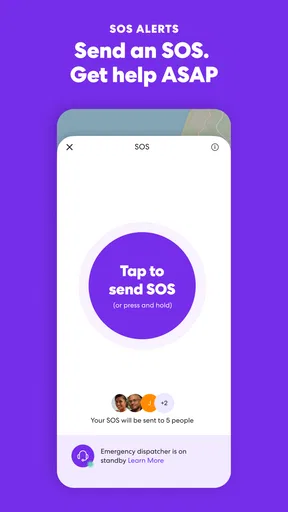
- SOS feature for emergencies.
- Battery-efficient tracking.
Limitations of Life360: Family Safety & GPS
- Some features require a premium subscription.
- Location accuracy can vary.
- Privacy concerns for some users.
- Heavy app data use on mobile plans.
- Occasional app crashes.
Similar Picks in This Category
View All
SmartThings
Samsung Electronics Co., Ltd.4.6

Google Home
Google LLC4.0

Pinterest4.2

Astrotalk - Talk to Astrologer
Astrology & Horoscope4.7

My Verizon
Verizon Consumer Group4.5

Samsung Wallet (Samsung Pay)
Samsung Electronics Co., Ltd.4.1
You May Also Like
View All

Frequently Asked Questions
What is Life360 and how does it work?
Life360 is a family safety app designed to keep you connected with your loved ones. It utilizes GPS technology to track real-time locations of family members, ensuring everyone is safe and accounted for. Users can create private groups called 'Circles' and communicate through the app, set location alerts, and check driving reports.
Is Life360 safe to use in terms of privacy?
Life360 prioritizes user privacy with features that allow control over who sees your location. Only members within your Circle can view your whereabouts. The app uses encrypted connections to protect your data, and users can adjust location sharing settings or turn off location tracking whenever needed.
Does Life360 drain phone battery quickly?
Life360 is designed to be efficient with battery usage, but like any GPS-based app, it does consume power. To minimize battery drain, the app uses location updates that balance accuracy and battery life. Users can also manage settings to optimize performance and conserve battery.
Can Life360 be used internationally?
Yes, Life360 can be used internationally as long as there is a mobile network or internet connection available. This makes it convenient for families who travel or live in different countries to stay connected. However, be aware of potential roaming charges if using data abroad.
What additional features does Life360 offer beyond location tracking?
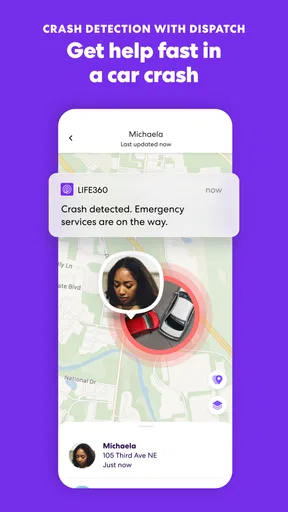
Beyond location tracking, Life360 offers features like driving reports, which include details on speed, hard braking, and rapid acceleration. It also provides crash detection, emergency assistance, and roadside support. These features help ensure the safety of all family members, especially those who drive frequently.
